Here a database pricing minimum cost is $0.36 per day.
https://cloud.google.com/sql/pricing#v1-pricing
Tuesday, 1 March 2016

Monday, 21 December 2015
esp8266
Based on the nice instruction, now I have to try ITO with the little module esp8266.
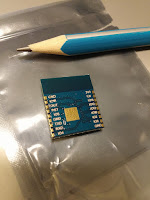

- In this this experiment I follow the esp8266 repository. As the preparation below,
- Install Arduino 1.6.5 or higher from the Arduino website.
- Start Arduino and open Preferences window.
- Enter http://arduino.esp8266.com/stable/package_esp8266com_index.json into Additional Board Manager URLs field.
- You can add multiple URLs, separating them with commas.
- Open Boards Manager from Tools > Board menu and install esp8266 platform (and don't forget to select your ESP8266 board from Tools > Board menu after installation).

รายละเอียดอื่นเกี่ยวกับคุณสมบัติ esp8266 สามารถหาได้จาก docs
An example code to connect to a network using DHCP.
-------------------------------------------------------------------------------
#include <ESP8266WiFi.h>
const char* ssid = "networkID";//enter your network ssid
const char* password = "password"; //password of the network
void setup(){
Serial.begin(115200); //an esp8266 uses 115200 bit rate by default
delay(100); //some small delay the get the serial connection ready
//attempting to connect the network and aquiring IP from a DHCP server
Serial.print("Connecting to netwok");
Serial.println(ssid);
WiFi.begin(ssid, password);
//waiting for connection
while (WiFi.status() != WL_CONNECTED){
delay(500);
Serial.print(".");
}
//show connection details
Serial.println("Connected IP address: ");
Serial.println(WiFi.localIP());
}
void loop() {}
----------------------------------------------------------------------------------
Thursday, 29 October 2015
Monday, 14 September 2015
regular expression
https://support.google.com/docs/answer/3378864?hl=en
http://www.w3schools.com/jsref/jsref_obj_regexp.asp
http://www.w3schools.com/jsref/jsref_obj_regexp.asp
Wednesday, 2 September 2015
Tuesday, 25 August 2015
Enabling OMP on PC
In cs426, we use OpenMP both on PC and in SciCloud. If you want to try OpenMP on you laptop or PC, you may have to install some software as following.
- get CodeBlock IDE and MinGW
- include C:\MinGW\bin to system path
- install mingw32-pthreads-w32 using C:\MinGW\bin\mingw-get.exe
- In codeBlock, Settings>>compiler>>linker setting>>link library=C:\MinGW\bin\libgomp-1.dll
- In codeBlock, Settings>>compiler>>compiler settings>>other options= -fopenmp
You may need to restart your computer to apply the new configuration.
Subscribe to:
Posts (Atom)